---
title: How to Update Your Office Name, Phone Number, Address, and Email In Your Website Footer
description: In this article, you'll learn how to update your office name, phone number, address, and email as it displays in your v2 website footer.
---
[Skip to content](https://v2-help.curaytor.com/v2-help/how-to-update-your-office-name-phone-number-address-and-email-in-your-website-footer#main-content)
English
Show submenu for translations
[](https://v2-help.curaytor.com/v2-help/?hsLang=en)
Open main navigation
Close main navigation
- English
Show submenu for translations
How can we help you?
- There are no suggestions because the search field is empty.
1. [Curaytor Website Help Center (v2)](https://v2-help.curaytor.com/v2-help?hsLang=en)
2. [Curaytor Website](https://v2-help.curaytor.com/v2-help/curaytor-website?hsLang=en)
# How to Update Your Office Name, Phone Number, Address, and Email In Your Website Footer
## In this article, you'll learn how to update your office name, phone number, address, and email as it displays in your v2 website footer.
Here are the steps to follow:
1. **Login to the Curaytor platform.**
2. **Go to content.curaytor.com. This will bring you to the backend of your site.**
3. **Click the settings icon in the top left corner of your screen. 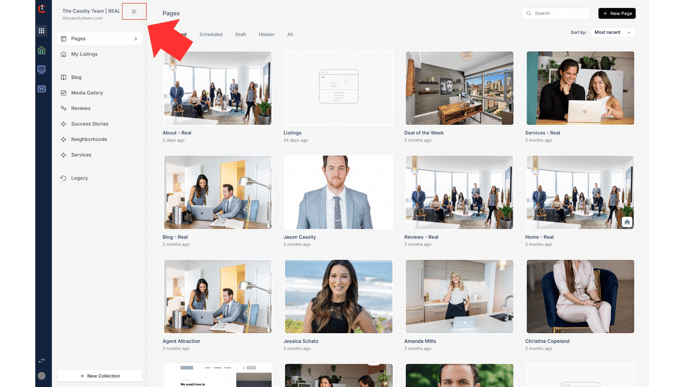**
4. **Click "Footer Settings" under "Branding." 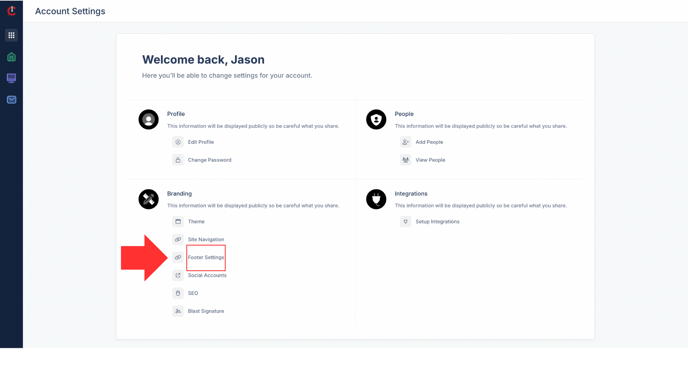**
5. **Here you'll be able to update all of your footer information. After you finish making edits, click "Save" in the bottom right corner. 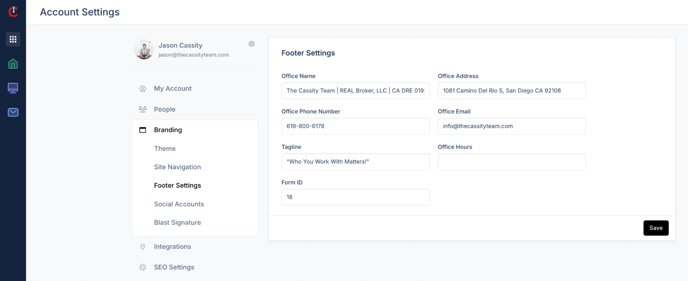**
- [Curaytor Website](https://v2-help.curaytor.com/v2-help/curaytor-website?hsLang=en#main-content)
- [Listing Pages](https://v2-help.curaytor.com/v2-help/curaytor-website?hsLang=en#listing-pages)
- [Curaytor Training Assets](https://v2-help.curaytor.com/v2-help/curaytor-training-assets?hsLang=en)
[](https://api.curaytor.io/sites/1/media/210191/curaytor-logo-new-compressor.png)
[mailto:email@email.com](mailto:email@email.com)
Copyright © 2026, Curaytor