---
title: How to Edit the Global SEO Settings
description: In this article, you'll learn how to edit your global SEO settings on your v2 Curaytor website for SEO optimization.
---
[Skip to content](https://v2-help.curaytor.com/v2-help/how-to-edit-the-global-seo-settings#main-content)
English
Show submenu for translations
[](https://v2-help.curaytor.com/v2-help/?hsLang=en)
Open main navigation
Close main navigation
- English
Show submenu for translations
How can we help you?
- There are no suggestions because the search field is empty.
1. [Curaytor Website Help Center (v2)](https://v2-help.curaytor.com/v2-help?hsLang=en)
2. [Curaytor Website](https://v2-help.curaytor.com/v2-help/curaytor-website?hsLang=en)
# How to Edit the Global SEO Settings
## In this article, you'll learn how to edit your global SEO settings on your v2 Curaytor website for SEO optimization.
If you want to update the featured image in your menu, this is also where you'll do that.
Here are the steps to follow:
1. **Login to the Curaytor platform.**
2. **Go to content.curaytor.com. This will bring you to the backend of your site. **
3. **Click the settings icon in the top left corner of your screen. 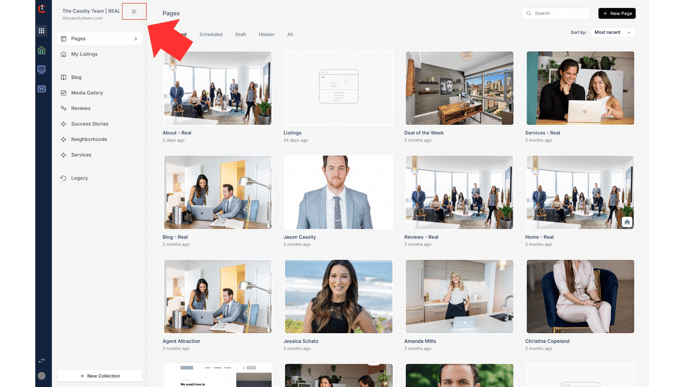**
4. **Click "SEO" under "Branding." 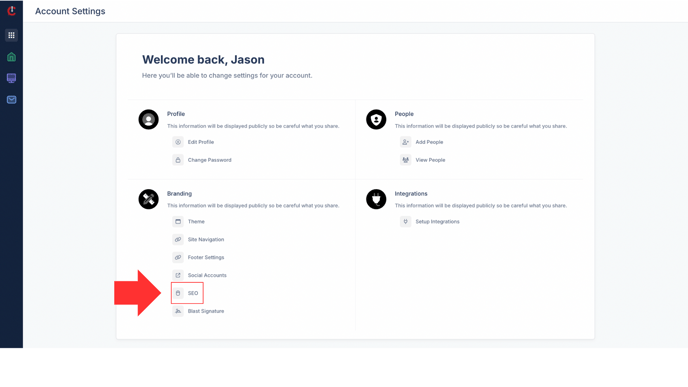**
5. **Here you can edit your Title Tag, meta description, and featured image for your site (this featured image also shows up as the featured image in your menu). 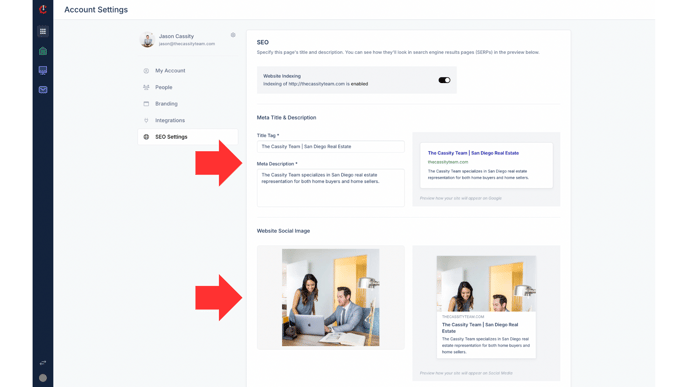**
Watch the video below for a full walkthrough 👇
[https://www.loom.com/share/4d66852c7952482b8e856f54563f5e7b?sid=1791dc7c-647b-41a7-b68a-a429fb55e686](https://www.loom.com/share/4d66852c7952482b8e856f54563f5e7b?sid=1791dc7c-647b-41a7-b68a-a429fb55e686)
- [Curaytor Website](https://v2-help.curaytor.com/v2-help/curaytor-website?hsLang=en#main-content)
- [Listing Pages](https://v2-help.curaytor.com/v2-help/curaytor-website?hsLang=en#listing-pages)
- [Curaytor Training Assets](https://v2-help.curaytor.com/v2-help/curaytor-training-assets?hsLang=en)
[](https://api.curaytor.io/sites/1/media/210191/curaytor-logo-new-compressor.png)
[mailto:email@email.com](mailto:email@email.com)
Copyright © 2026, Curaytor