---
title: How to Add/Remove Collections
description: In this article, you'll learn how to add and remove Collections on your v2 Curaytor website.
---
[Skip to content](https://v2-help.curaytor.com/v2-help/how-to-add/remove-collections#main-content)
English
Show submenu for translations
[](https://v2-help.curaytor.com/v2-help/?hsLang=en)
Open main navigation
Close main navigation
- English
Show submenu for translations
How can we help you?
- There are no suggestions because the search field is empty.
1. [Curaytor Website Help Center (v2)](https://v2-help.curaytor.com/v2-help?hsLang=en)
2. [Curaytor Website](https://v2-help.curaytor.com/v2-help/curaytor-website?hsLang=en)
# How to Add/Remove Collections
## In this article, you'll learn how to add and remove Collections on your v2 Curaytor website.
What is a Collection?
A Collection is simply a way to organize/group the content on your site.
Collections are most commonly used for Services and Community pages.
For example, you may want to create a "Services" collection that holds your Buyer, Seller, and Commercial pages.
Or, you may want to create a "Community" collection that features the 8 communities you serve and their individual pages.
A collection is simply a feature that you can use to keep things organized in the backend of your website.
When you want to create a new collection, here are the steps to follow:
1. **Login to the Curaytor platform.**
2. **Go to content.curaytor.com. This will bring you to the backend of your site.**
3. **Click "+ New Collection" at the bottom left corner of your screen. 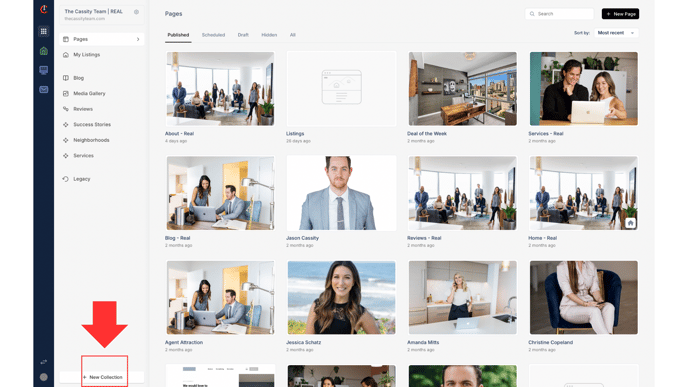**
4. **Name your collection. Click "Create." 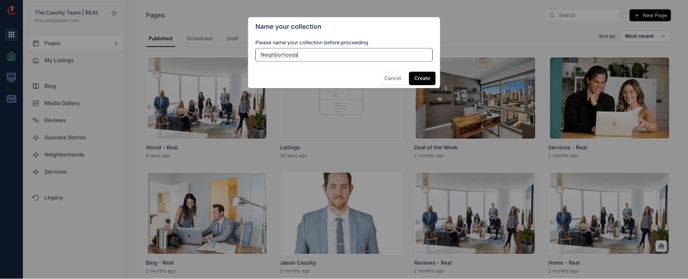**
5. **Once you create a collection, it will appear in the left column and automatically create a page for you. To edit that page, click into your collection, and at the top, click "Edit."** [*\*To learn how to create and publish new pages, click* here. 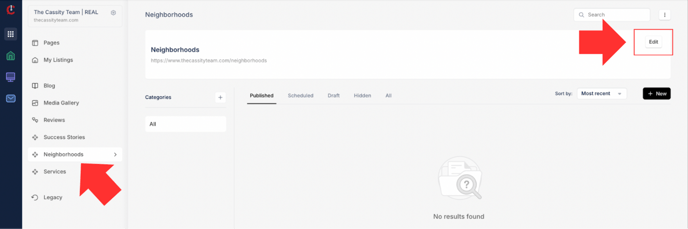](https://v2-help.curaytor.com/v2-help/how-to-create-and-publish-new-pages?hsLang=en)
6. **If you'd like to create a page to add to your collection, or add an existing page to your collection, simply go into the Settings of that particular page, scroll down to "Collection" and choose the collection you'd like the page to live.** *\*Please note that this will automatically update the URL. For example, if you added a "Buy" page to your new "Services" collection, the URL would change from* ***abcrealty.com/buy → abcrealty.com/services/buy. 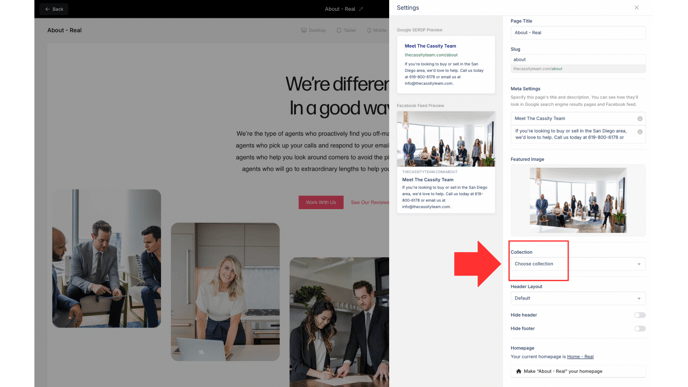***
7. **Once your page lives in a collection, you'll be able to access that page by clicking on the collection. It will no longer live in the "Published" pages section. 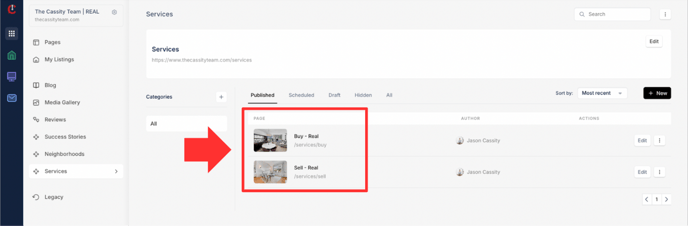**
Watch the video below for a full walkthrough 👇
[https://www.loom.com/share/7efe190301564da1b56ae1c7249143ee?sid=4d07acfd-7b4f-43f0-b553-0c0f91931329](https://www.loom.com/share/7efe190301564da1b56ae1c7249143ee?sid=4d07acfd-7b4f-43f0-b553-0c0f91931329)
- [Curaytor Website](https://v2-help.curaytor.com/v2-help/curaytor-website?hsLang=en#main-content)
- [Listing Pages](https://v2-help.curaytor.com/v2-help/curaytor-website?hsLang=en#listing-pages)
- [Curaytor Training Assets](https://v2-help.curaytor.com/v2-help/curaytor-training-assets?hsLang=en)
[](https://api.curaytor.io/sites/1/media/210191/curaytor-logo-new-compressor.png)
[mailto:email@email.com](mailto:email@email.com)
Copyright © 2026, Curaytor